Posts

Showing posts with the label sccm

Power BI : Microsoft Office Telemetry Dashboard

Image
Microsoft Office's Telemetry Dashboard is an essential add-on for giving your environment an Office Health Index - where you have it, licensing, upgrade, tracking issues, AppCompat etc. The insight telemetry provide is priceless and yet free. Here the data sources are both the telemetry database, telemetry excel dashboard, and the SCCM database. Installation + Configuration of Telemetry : https://technet.microsoft.com/en-us/library/jj863580.aspx?f=255&MSPPError=-2147217396 Configure and deploy the dashboard : https://technet.microsoft.com/en-us/library/jj853312.aspx?f=255&MSPPError=-2147217396 want the  pbix  file ?  share this post on  twitter  or  fb  and comment with the link of ur shared post & your email in the comment window below.
Power BI : How to make quick awesome looking dashboard for SCCM

Image
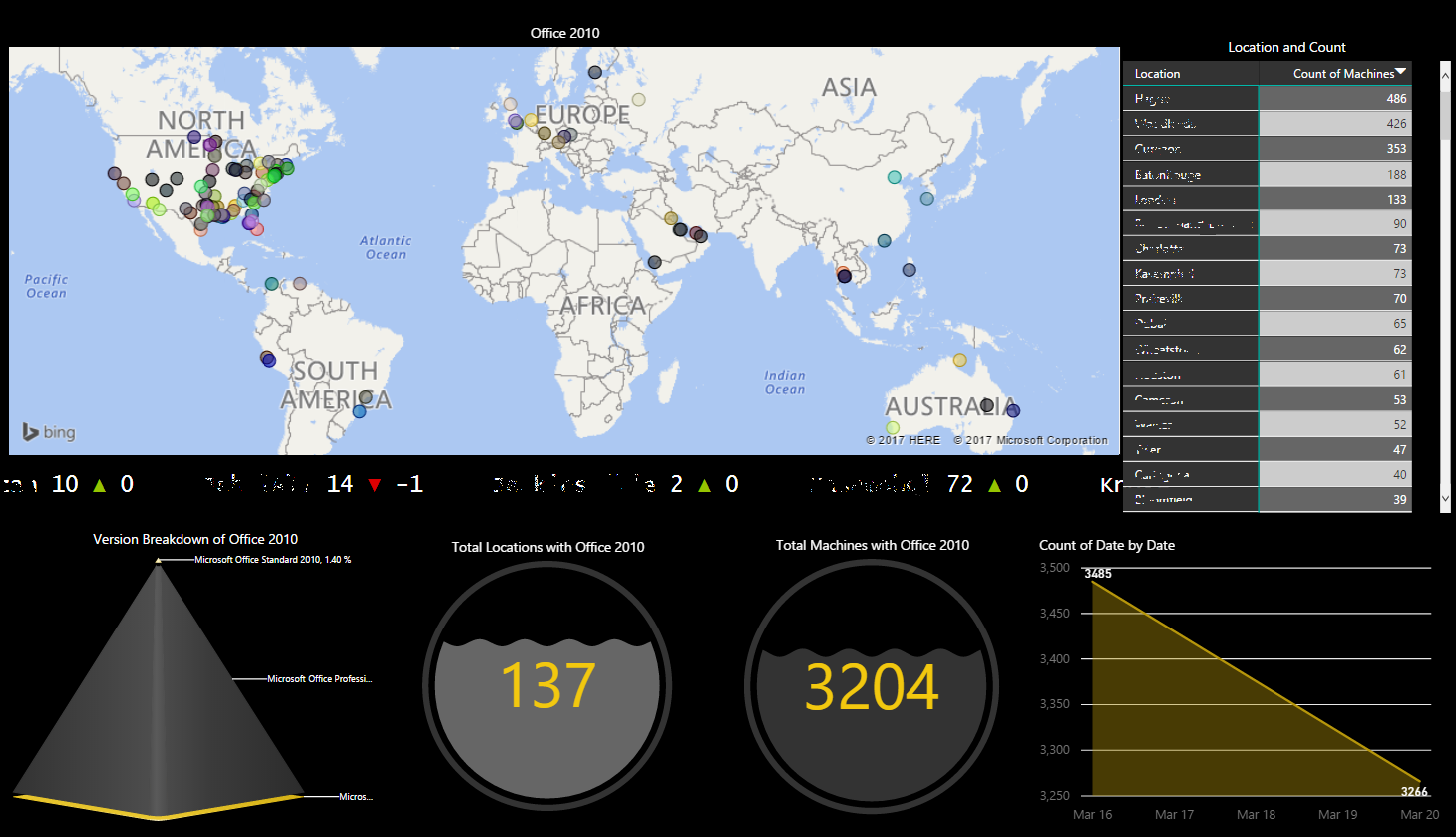
An awesome example of what power bi can do - and its all interactive and dynamic content - which sync's with your sql data in real time. a little bit of sql and little bit of excel does the magic. The dashboard above was created to show the remnants of Office 2010 in the environment. what all do we have in here ? A dynamically created map based on location pulled from SCCM a scrolling ticker indicating increase or decrease in count as per trends count of machines per location trends indicated by a simple graph  a dynamic water level indicators for data. a dynamic pyramid based breakup Query used to pull from SQL > ------------------------------------------------------------------------------------------ SELECT       distinct vrs.AD_Site_Name0, vrs.Distinguished_Name0, vrs.Netbios_Name0, vrs.Resource_Domain_OR_Workgr0, vrs.User_Name0, sof.ProductName0, sof.ProductVersion0, sof.Publisher0 FROM...

SCCM SQL Query : SQL Query for Client Count per AD Site

SELECT     R.AD_Site_Name0,     Count(SMS_Installed_Sites0) AS 'Count' From     v_R_System R     JOIN v_RA_System_SMSInstalledSites SIS ON R.ResourceID = SIS.ResourceID Group By     R.AD_Site_Name0 

SCCM SQL Query : SQL Query for Locations and Boundaries

select sys1.Name, sys1.DefaultSiteCode, (select SUBSTRING(sys2.ServerNALPath, CHARINDEX('\\', sys2.ServerNALPath) + 2, CHARINDEX('"]', sys2.ServerNALPath) - CHARINDEX('\\', sys2.ServerNALPath) - 3 ) + CASE sys2.Flags WHEN '1' Then ' (Slow)' WHEN '0' THEN '' END + '; ' as 'data()' from vSMS_BoundaryGroupSiteSystems as sys2 where sys1.GroupID=sys2.GroupID for XML path('')) as 'Site System', (select sys4.Value + '; ' as 'data()' from vSMS_BoundaryGroupMembers as sys3 left join vSMS_Boundary as sys4 on sys3.BoundaryID=sys4.BoundaryID where sys1.GroupID=sys3.GroupID for XML path('')) as 'Boundary', sys1.ModifiedOn, sys1.ModifiedBy from vSMS_BoundaryGroup as sys1

SCCM SQL Query : Find Lync Versions

select   distinct v_R_System.User_Name0,v_r_system.Name0,v_R_System.Active0,v_Add_Remove_Programs.DisplayName0,v_Add_Remove_Programs.TimeStamp,v_Add_Remove_Programs.InstallDate0,v_Add_Remove_Programs.Version0 from v_Add_Remove_Programs inner join v_R_System on v_Add_Remove_Programs.ResourceID = v_R_System.ResourceID where v_Add_Remove_Programs.DisplayName0 like 'Microsoft Lync 2010'

SCCM SQL Query : Computers with Pending Restart or other Update Enforcement States

SELECT SMS_R_SYSTEM.ResourceID, SMS_R_SYSTEM.ResourceType, SMS_R_SYSTEM.Name, SMS_R_SYSTEM.SMSUniqueIdentifier, SMS_R_SYSTEM.ResourceDomainORWorkgroup, SMS_R_SYSTEM.Client FROM sms_r_system inner join SMS_UpdateComplianceStatus ON SMS_UpdateComplianceStatus.machineid=sms_r_system.resourceid WHERE SMS_UpdateComplianceStatus.LastEnforcementMessageID = 9 There are several other enforcement states you can use instead by changing the number after ‘LastEnforcementMessage ID =’ at the end of the query. 1 – Enforcement started 3 – Waiting for another installation to complete 6 – General failure 8 – Installing update 9 – Pending system restart 10 – Successfully installed update 11 – Failed to install update 12 – Downloading update 13 – Downloaded update

SCCM SQL Query : Sql query for machines joined after a date

select distinct * from v_R_System where Creation_Date0 > '2014-12-01 06:22:10.000' and Resource_Domain_OR_Workgr0 = 'domainname' and Obsolete0 not like 1

SCCM SQL Query : Query to find package pending replication

select pkg.Name as C062, pkg.PackageID, SUBSTRING(dp.ServerNALPath, CHARINDEX('\\', dp.ServerNALPath) + 2, CHARINDEX('"]', dp.ServerNALPath) - CHARINDEX('\\', dp.ServerNALPath) - 3 ) AS C070, dp.SiteCode, dp.LastRefreshTime, stat.SourceVersion, stat.LastCopied, stat.SummaryDate, stat.InstallStatus, case when dp.IsPeerDP=1 then '*' else '' end as BranchDP from v_Package pkg join v_DistributionPoint dp on pkg.PackageID=dp.PackageID join v_PackageStatusDistPointsSumm stat on dp.ServerNALPath=stat.ServerNALPath and dp.PackageID=stat.PackageID where stat.State!=0 and DP.SiteCode in ('sitecode ')

1E Shopping Database : Query to find application enabled or disabled on Shopping

select * from tb_Application select * from tb_Application where Enabled = 1 select * from tb_Application where Enabled = 0

1E Shopping Database : Query for applications and their categories in Shopping

Select opsys.applicationref, SYS.PackageID, OPSYS.ApplicationId, OPSYS.DisplayName,opsys.Enabled, OPSYS.SMSInstallProgram, OP.ApplicationGroupID, AG.GroupName,opsys.Comment from tb_Application OPSYS join tb_SMSProgram SYS on SYS.SMSProgramID=OPSYS.SMSInstallProgram join tb_Applications_ApplicationGroups OP on OPSYS.ApplicationID=OP.ApplicationID join tb_ApplicationGroup AG on OP.ApplicationGroupID=AG.ApplicationGroupID 

1E Shopping Database : Query to find applications on a machine based on ip address

select  usr.FullName,mac.MachineName,mac.DomainName,mac.IPAddress,app.DisplayName,comp.RequestedTimestamp,comp.DateInstalled,  DeliveryStatus = CASE comp.DeliveryStatus            WHEN '1' THEN 'Completed'         WHEN '2' THEN 'Failed'         WHEN '3' THEN 'Pending'         WHEN '' THEN 'Unknown' END from tb_CompletedOrder comp join tb_Machine mac on comp.MachineId=mac.MachineId join tb_User usr on comp.UserId=usr.UserId join tb_Application app on comp.ApplicationId = app.ApplicationId where  mac.IPAddress in ('10.0.0.0')

1E Shopping Database : Query to check app installed by a machine in Shopping

select  usr.FullName,mac.MachineName,mac.DomainName,mac.IPAddress,app.DisplayName,comp.RequestedTimestamp,comp.DateInstalled,  DeliveryStatus = CASE comp.DeliveryStatus            WHEN '1' THEN 'Completed'         WHEN '2' THEN 'Failed'         WHEN '3' THEN 'Pending'         WHEN '' THEN 'Unknown' END from tb_CompletedOrder comp join tb_Machine mac on comp.MachineId=mac.MachineId join tb_User usr on comp.UserId=usr.UserId join tb_Application app on comp.ApplicationId = app.ApplicationId where MachineName like '%ABC123%'

1E Shopping Database : Delete machine history from database

delete   from  tb_Machine  where  MachineName = 'XXXX'

1E Shopping Database : Sql query to find apps which failed in appstore -sort by time

select usr.FullName,mac.MachineName,mac.DomainName,mac.IPAddress,app.DisplayName,comp.RequestedTimestamp,comp.DateInstalled, DeliveryStatus = CASE comp.DeliveryStatus            WHEN '1' THEN 'Completed'         WHEN '2' THEN 'Failed'         WHEN '3' THEN 'Pending'         WHEN '' THEN 'Unknown' END from tb_CompletedOrder comp join tb_Machine mac on comp.MachineId=mac.MachineId join tb_User usr on comp.UserId=usr.UserId join tb_Application app on comp.ApplicationId = app.ApplicationId where comp.DeliveryStatus ='2' and RequestedTimestamp > '2014-01-30 00:00:00.700'

SCCM SQL Query : to find package size

SELECT DISTINCT p.PackageID, p.Name, 'Source Size (MB)' = n.SourceSize FROM v_Package p LEFT JOIN v_PackageStatusRootSummarizer n ON   p.PackageID = n.PackageID

SCCM Troubleshooting : How to reset bits

To be run on client > Launch command as administrator net stop bits Delete the qmgr*.dat files. To do this, type the following command at a command prompt, and then press ENTER: Del "%ALLUSERSPROFILE%\Application Data\Microsoft\Network\Downloader\qmgr*.dat" net start bits

SQL Admin : Dbcc shrinkfile sql troubleshooting compress tempdb

use tempdb go dbcc shrinkfile (2, 10) go dbcc shrinkfile (1,10)

Powershell : to check inboxes and sort by largest file

Get-ChildItem "F:\SMSPKGF$" -recurse | Where {!$_.PSIsContainer} | Group Directory | sort-object count -descending | Format-Table Name, Count -autosize

SCCM SQL Query : to find client reporting to each IP boundary

select servername, sitecode, count(distinct name0) 'clients' from ProtectedSiteSystem_ARR PSS join v_BoundaryInfo bound on pss.BoundaryID=bound.BoundaryID join v_RA_System_IPSubnets subs on subs.IP_Subnets0=bound.value join v_R_System sys on sys.resourceID=subs.resourceID where client0=1 and obsolete0=0 group by servername, sitecode order by count(*) desc

SCCM SQL Query : to find out collection memberships of a machine

select v_FullCollectionMembership.CollectionID, v_Collection.Name from v_FullCollectionMembership join v_Collection ON v_FullCollectionMembership.CollectionID = v_Collection.CollectionID where  v_FullCollectionMembership.Name = 'machinename'